 |
|
 |
 |
 |
 |
 |

AutoMate™ Programming System
 Documentation
The AutoMate™ Programming System (APS) is a complete, integrated programming, documenting, debugging, and monitoring tool for Reliance AutoMate 15, 20, 20E, 30, 30E, 40, 40E, and 40X programmable logic controllers. APS provides everything you need to develop and document AutoMate applications, from the initial planning stages to start up and through long-term maintenance.
APS is available now from Reliance Electric or directly from ACS.
Documentation
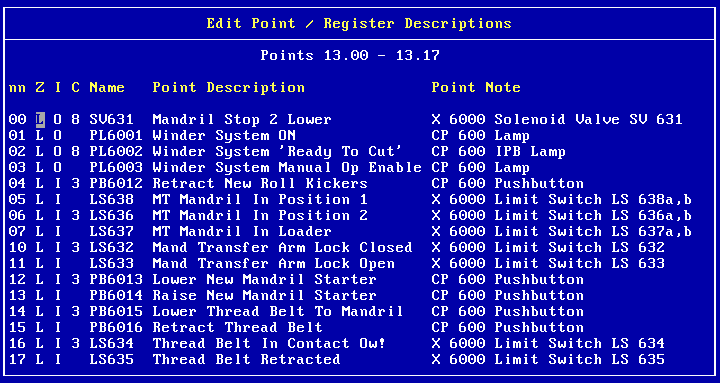 APS provides what may be the most complete Programmable Controller documentation in the industry. It includes a unique full-screen Input/Output List Database Editor to define all points and registers (real, internal, global, and system) in your AutoMate application. The only limit on the number of definitions is disk space.
APS maintains an individual database for each of your AutoMate applications. This database contains all of the annotation information for the application. To help you get started, APS automatically sets up definitions for all system points and registers.
APS is designed to be useful from the very earliest stages of your project. You can define points and registers before you begin programming. Since APS tracks I/O Module, rack, and card usage, you can use the program to determine your hardware ordering requirements. Building a database for a PLC application is a complicated task, so APS provides a complete set of editing and management tools, including copying, moving, exporting, importing, row-to-row copying, and automatic definition generation.
As you program, APS will show you the definitions of your coils and contacts. You can use the database to assign a six-character symbolic name to any point address, then use that symbolic name anywhere a point address is valid. This lets you program with words or drawing references instead of cryptic point addresses.
Documented Program Listing
The Documented Program Listing is the centerpiece of APS's reports. This listing contains all of the ladder rungs in your application program, fully commented and crossreferenced. To see a sample documented ladder, see below. When printing the Documented Listing, APS comments each ladder rung with the Name and Description fields from the database, along with any relevant Comment fields (described below). A crossreference table next to each ladder sequence locates any program line and sequence number where the coil is used as a normally open, normally closed, or transitional contact. Each contact in the rung's input logic is identified by its Description and source (Internal Relay, Real I/O, etc.). If the contact is also a coil elsewhere in the program, the "source" line number and address is listed. Here are some other features of the Documented Listing:
- Title Comments. To clarify and structure your ladder program logic, the Documenter supports two types of Title comments, which may be added to any or all sequences: Line Comments and Section Comments. These Titles are keyed to the sequence coil number. Line Comments are 60 characters long and appear centered (in emphasized type) above the sequence. Section Comments are 120 characters long, are printed in a box, and force a new page in the Documented Program Listing.
- Text Comments. You can attach up to 1000 lines (60 characters each) of additional explanatory text to any or all sequences in your application program using the Text Comment feature. Like the Title Comments described above, Text Comments are keyed to a sequence's coil number.
- Crossreferences. The Listing provides elaborate crossreferences that locate every coil, contact, register, and table of registers used in the program by sequence, line, and page number.
- Partial Print. If desired, you can produce only part of the Documented Listing. Even if you generate only a single page of printout, all reference information is included and "calibrated" to the full listing.
APS features a complete set of reports in addition to the documented listing: Point & Register list; Symbolic Name list; Hardware Inventory; and I/O Configuration.
 |
View APS Sample Reports in Adobe PDF format (118K). For a free PDF reader or browser plug-in, visit Adobe. |
Programming
APS provides complete documented programming, monitoring, and editing both Off Line and On Line (via direct connection, Serial Communications Card, or over R-Net using a Gateway or PC-Link card).
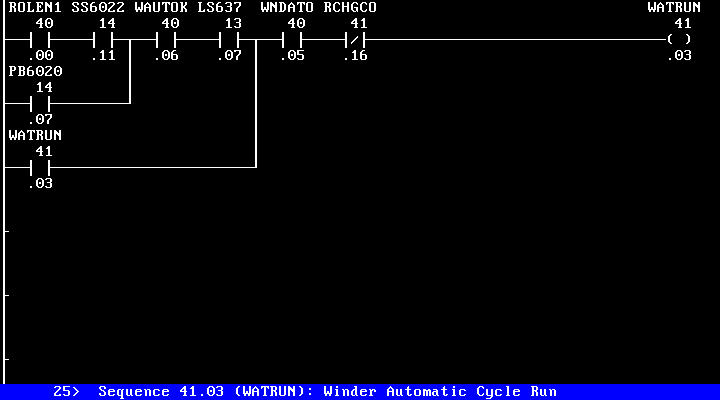
APS supports all of the traditional ladder programming functions, such as Insert, Delete, and Edit Sequence, Force I/O, Register and Point Monitor, Sequence Monitor, Program Upload and Download, Configure I/O, and so forth. It also features a powerful group of extensions.
Here are some of the APS's programming features:
- Contact Definitions. As you program, the status line shows the Point Definition (if any) for the contact currently under the cursor. This feature helps you to see what you're doing, preventing many difficult-to-trace errors. To further assist visual debugging, contacts and coils are always shown with their Names.
Symbolic names. You can program using Point Addresses, symbolic names, or a mixture of both. For example, suppose that you had assigned the Name "LS100" (Limit Switch 100, perhaps) to point address 12.13. When programming, you could add a contact, typing "LS100" as the address. The Programmer would look up the definition for LS100 and fill in the correct point address, 12.13.
Systematic use of symbolic names can make it possible to program directly from drawings or process flow diagrams.
- Copy / Cut & Paste. APS has a full set of "Copy" and "Cut and Paste" functions. You can copy (merge) sequences from other programs, move sequences within the current program, copy register values, and so forth.
You can also move programs from one processor model to another. Copied sequences are always checked for valid point and register numbers, duplicate coils, etc.
- Delete. APS's Delete command can remove a range as well as single sequences. The last group of deleted sequences is always saved, so you can undo inadvertent deletions. This feature can also be used as a Move command: simply delete a group of sequences, move the Program Pointer to the new location, and retrieve the deleted sequences.
- Search. A powerful set of Search commands is built into APS. These commands work like "filters", allowing you to perform tasks like "edit every sequence that refers to Point 12.14". You can search for "point used as a contact", "any use of a point (including inside Function Blocks)", "any use of a Register", and more. The Search features are extremely fast, usually finding a match (if any) in less than a second.
- Search & Replace. As a complement to the traditional "Search" function, APS provides an actual "search and replace" function. For example, you can replace every Normally Open Contact 12.17 with a Line, or change every use of Point 42.15 to Point 44.05.
- Elapsed Checking. In addition to normal error checking, APS will warn you if enter an Elapsed register (in a Counter, Shift Register, etc.) that has already been used as an Elapsed elsewhere in the program.
- Ladder Editor. APS provides a complete complement of ladder editing functions, including Horizontal and Vertical "Ladder Expand" commands.
- A20 Configuration. For AutoMate 20 users, APS features a "Configure I/O" mode especially designed for the A20. This mode allows you to set starting register numbers and select I/O Types from a menu; the Programmer automatically generates and assigns the correct mask values to the A20's Configuration registers.
Further, the Configuration values are stored in the application program file and uploaded to the processor along with the program. This prevents frustrating problems with incorrect or unset A20 Configuration registers.
- System Coils. Symbolic names provide easy access to system coils, since APS provides automatic, standardized names for them. No more trying to remember the 1 Hz "heartbeat" contact address on an A40E... just type RTC1.0!
- Modify Documentation. You can add or change documentation definitions while programming. Use this feature to add new symbolic names, document the use of Internal Relays, and so on.
- Translated Copy. This function translates contact numbers based on symbolic names, allowing you to renumber all the I/O in an entire application program in one operation.
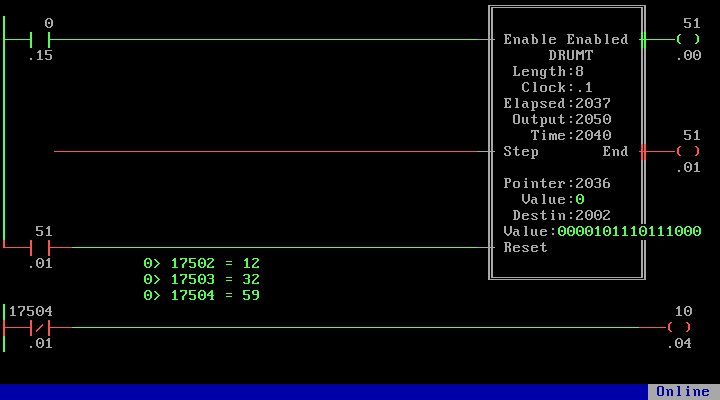
- Documented Drum Editing. I/O List information appears during Drum Table Editing, making it simple to set and verify the correct Event and Output values.
- APX support. APS provides full support for existing AutoMate applications built with APX (the AutoMate Programming Executive); the program can both read and write APX-format application files.
Macros
APS has a unique Macro feature. This function allows you to create and edit sequence "templates" that are "executed" to add rungs to your AutoMate application program.
These "templates" look like ordinary rungs, except that contact, coil and register numbers may not be known until the template is executed. For example, a contact address might be a constant (the same every time the macro is executed), a symbolic name (translation to point address takes place at execution time), or a variable (twenty-six variables are allowed).
Each time that you execute the Macro, APS will stop to allow you to fill in any values that it does not already know. Once you have assigned a value to a particular variable, that value will appear everywhere else the given variable is used.
With Macros, you only create the rungs and contact arrays once, then "execute" them many times. Each time, you fill in only the missing or variable values. Accordingly, macros can greatly speed entry of repetitive groups of ladders, such as alarm sequences. Further, since the macro defines the rung shapes and contact locations, you can avoid dozens of ladder-construction errors when creating repetitive sequences.
To make macros even simpler, APS allows you to assign a Prompt string to each variable and rung. These strings appear to guide you through the macro as it executes.
Each macro can contain as many rungs as you need (limited only by disk space), and you may have any number of macros (again, limited by disk space).
Macro Mode also has extensive editing and printing features to make maintaining macros simple. Since macros are kept "one per file", you can freely copy and modify them or distribute them to multiple stations.
Monitoring
APS provides a powerful selection of Monitoring features, including:
 Monitor Multiple Sequences. In Sequence Monitor, you can monitor more than one rung at a time. In fact, you can watch as many rungs as will fit on the computer display. Further, you can assign 5 "pages" of sequences to function keys and then switch among them at will.
- Numeric Monitors. You can add numeric monitors to a Sequence Monitor display. These monitors show the values of registers you select even as the sequence status is updated.
-
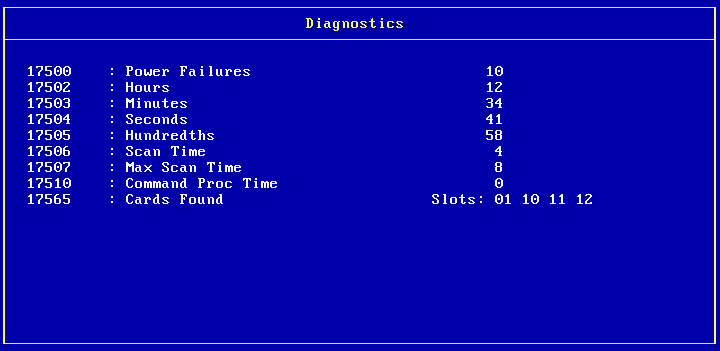
Diagnostics. APS's Diagnostics mode examines and decodes the machine-state and status registers on the AutoMate processor. This feature can greatly speed the diagnosis and resolution of hardware problems.
- History Mode. APS can log register and point values to disk for later playback. You can set the logging speed, enabling criteria, and "trip" mode to suit your requirements.
-
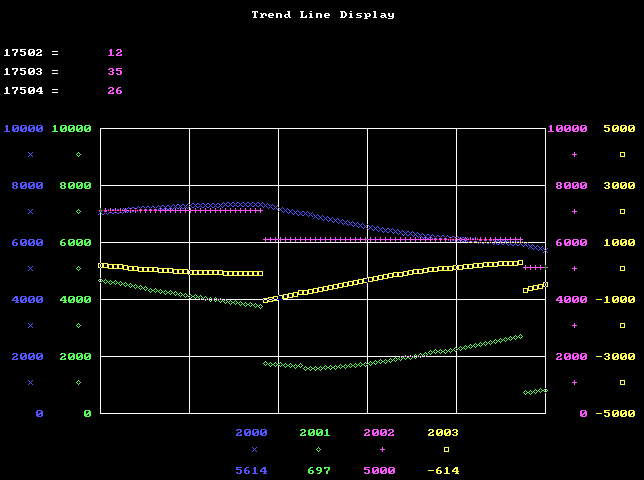
Trend Line. APS provides a graphical trend-line monitoring display for up to four register values.
- Modify Registers. While monitoring sequences, you can modify register values and Force I/O.
- Register Monitor. The Register Monitor allows you to watch up to 60 points or registers in Decimal, Binary, Hex, or Octal, or a mixture. You can also place Text Labels to explain the monitor values.
- Stored Monitor Pages. You can save Sequence and Register Monitor pages to a disk file, making it easy to store and recall frequently-used monitoring setups.
-
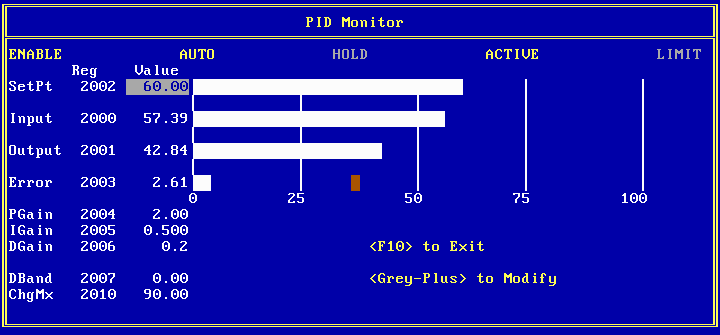
PID Monitor. APS has full graphic monitoring for PID loops. The PID Monitor also permits you to alter loop parameters.
- Drum Table Editor. APS's powerful Drum Table Monitor permits interactive monitoring and table editing while On or Off Line. The Drum Table is shown completely documented. The Drum Table Editor features Insert and Delete Step, Insert and Delete Point, and more.
- Strings. APS provides a full set of String monitoring and editing for AutoMate 40 processors.
Sample Displays
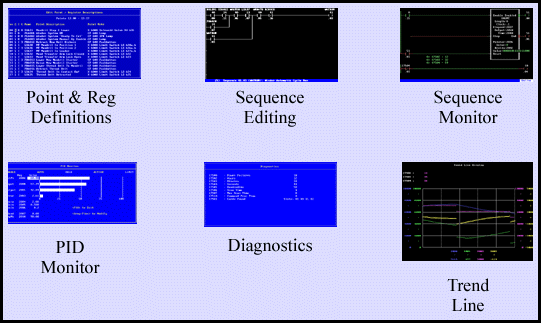
Click on the thumbnails below to see full-size images.
Documentation Fields
Here are the fields that APS can store for various types of project information:
| Points | Description | 30 characters, expandable to 3 lines of 45 characters |
| Note | 30 characters | |
| Name | 6 character symbolic name interchangeable with address | |
| Zone | 1 character | |
| I/O Type | 1 character, indicates I/O Module type for points used as real I/O | |
| Registers | Description | 30 characters |
| Note | 30 characters | |
| Racks | Type | Indicates number of slots |
| Rack Name | 6 character identifying name | |
| Description | 30 characters | |
| Note | 30 characters | |
| Cards & I/O Modules | Name | 30 characters |
| Part Number | 15 characters | |
| Rung Comments | Section Comment | 2 lines of 60 characters, starts a new page in documented listing |
| Rung Comment | 1 line of 60 characters | |
| Text Comment | Up to 1000 lines of 60 characters | |
System Requirements
APS needs an IBM PC or compatible with at least 1MB of RAM. Expanded (EMS) memory will greatly speed APS's operation. Most DOS memory managers, such as QEMM, can provide EMS memory emulation automatically.
Though APS can run in a "DOS box" under Windows 3.x, Windows XP, Windows 9x, Windows 7, or Windows NT, best performance (especially while monitoring) will come while operating under "plain DOS."
Trend line monitoring requires a VGA or equivalent.
To communicate with the AutoMate processor, you'll need a standard serial port. You can use Reliance's R-Net local area network to monitor, though it's usually best to program through the processor's front port or via a Serial Communications Card. If you want to connect via R-Net, you'll need a standard serial port and a Gateway, or a PC-Link card for a direct connection to the network.
|
Download the APS User's Manual in Adobe PDF format (1MB). For a free PDF reader or browser plug-in, visit Adobe. |
Communications Cable
You will need an RS-232 serial communications port and a cable to connect your computer to the AutoMate. The cable uses a 3-wire "null modem" design.
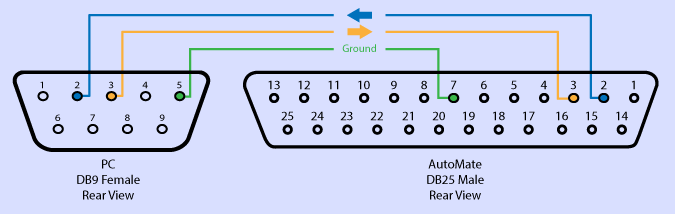
| PC | AutoMate |
|---|---|
| 9-pin female | 25-pin male |
| 2 | 2 |
| 3 | 3 |
| 5 | 7 |
It's important to use only a 3-wire cable. Connecting any of the "handshaking" pins (e.g., Clear to Send) can prevent communications between the two devices.
Version 1.0g6 Updater
If you already own copies of APS, you can upgrade them to the final version, v1.0g6, by downloading and running this update tool. Important note: This updater is only for versions of APS that are protected by a hardware key. Please contact ACS for the proper updater if you have a site license.
 |
Download version 1.0g6 updater. To use the updater, unzip it to an empty folder and follow the directions in the read.me file. |